Looks like you're in [country-name]. Switch to the [site-name] for local equipment and services?

Go to [site-name]
Stay here

User account menu

  • 844.873.4948
  • English

    Europe

    • Français
    • Deutsch
    • English
    • Nederlands

    North America

    • English
    • Español
    • Français
  • Sign In / Register
United Rentals Home
  • Rent
    • All Equipment
    • Popular Rentals
    • Scissor Lifts
    • Boom Lifts
    • Telehandlers
    • Mini Excavators
    • Skid Steers & Track Loaders
    • Rental Resources
    • Rental Protection Plan (RPP)
  • Buy
    • All Used Equipment
    • Popular Used Equipment
    • Buy Forklifts
    • Buy Scissor Lifts
    • Buy Boom Lifts
    • Buy Mini Excavators
    • Buy Compressors
    • Buying Resources
    • Financing
    • United Guard™
  • Total Control
    • Account Dashboard
    • Invoices & Payments
    • Items On Rent
    • UR Mobile App
  • Invoices & Payments
    • Invoices
    • Lien releases
    • Apply for credit
  • Locations
    • Find a Location
  • Training
    • Course Catalog
    • Training Credentials
    • United Academy
    • About United Academy
    • Care & Support
    • United Academy - Course Catalog
  • Solutions
    • Worksite Perfomance Solutions
    • Specialty Solutions
      • Ground Protection Matting Solutions
      • Commercial Trucks
      • Flooring & Facility Solutions
      • Power & HVAC
      • Climate Solutions
      • Fluid Solutions
      • Trench Safety
      • Reliable Onsite Services
      • Tool Solutions
      • Storage Containers & Mobile Offices
      • Communications
      • Industrial Blinds
    • Power & HVAC
    • Climate Solutions
    • Fluid Solutions
    • Trench Safety
    • Reliable Onsite Services
    • Tool Solutions
    • Storage Containers & Mobile Offices
    • Commercial Trucks
    • Flooring & Facility Solutions
    • Ground Protection Matting Solutions
    • Industry Solutions
      • Power Generation & Distribution
      • Chemical
      • Oil & Gas Refining
      • Oilfield Services
      • Civil and Infrastructure
      • Restoration and Remediation
      • Government Solutions
      • Agriculture
    • Power Gen. & Distribution
    • Data Centers
    • Renewable Energy
    • Chemical
    • Oil & Gas Refining
    • Oilfield Services
    • Restoration & Remediation
    • Civil & Infrastructure
    • Government Solutions
    • Emergency Solutions
    • Emergency Response
  • Services
    • Digital Solutions
    • Total Control®
    • Mobile App
    • Notifications
    • Benchmarking
    • Wedge
    • Downloadable Catalogs
    • Repair & Maintenance Services
    • Owned Equipment Service
    • Rental Equipment Service
    • Training Services
    • United Academy
  • Safety
    • Safety Commitment
    • Safety Training
    • Safety Articles
  • Company
    • About Us
      • About Us
      • Our Culture
      • Board of Directors
      • Corporate Leadership
      • Mission & Values
      • Sponsorships & Partnerships
      • Awards & Recognition
      • Corporate Responsibility Report
      • Supplier Diversity
      • Project Uptime
    • Investor Relations
      • Annual Report
      • Reports & Proxy Statements
      • Corporate Governance
      • Investor Press Releases
      • Investor Events, Calls & Presentations
      • Research Coverage
      • SEC Filings
    • Sustainability
    • Careers
      • Search Careers
      • Career Areas
    • Events
      • Events Calendar
      • Webinar Series
    • In the News
    • Press Releases
    • Project Uptime Blog
  • Project Uptime
  • Equipment
  • Data
  • Safety
  • Expertise
  • All Categories
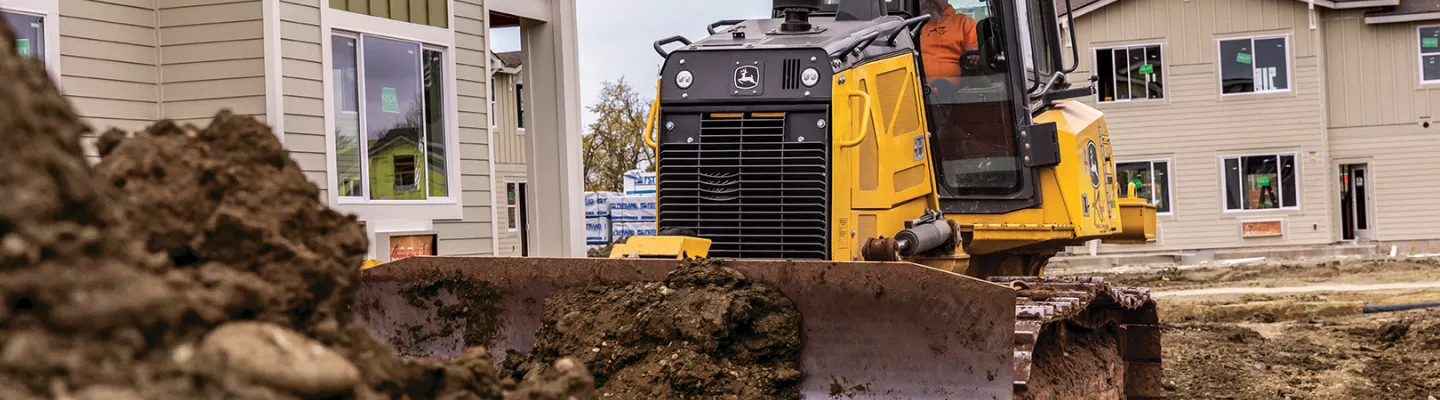
Bulldozer-Article-Banner.jpg

How to Operate a Bulldozer: A Step-By-Step Guide

Using these heavy machines requires a degree of finesse. Brush up on the basics.

September 22, 2023
  • How to Use

Bulldozers have the muscle to move heavy materials with ease. But driving any type of bulldozer—wheel dozer, crawler or mini bulldozer—can be challenging, even for experienced operators. The best way to learn how to operate a bulldozer is to take a training course. If you need a quick refresher, here are the basic steps.

Inspect the bulldozer

Inspect the bulldozer before and after you use it. Look for leaks and visible damage such as cracks, dents and wear. Top off the fuel, oil, coolant, transmission oil and hydraulic fluids, and check air filters and grease fittings. Because vibrations can loosen doors and latches, check to make sure doors can be securely closed and locked so they won’t swing open while you drive. Preventive dozer maintenance helps you avoid downtime and expensive repairs.

Enter the bulldozer

Maintain three points of contact when climbing into the cab using the safety rails and steps. Don’t step on the tracks or your boot might get stuck in the teeth (grousers). Fasten your seatbelt once seated.

Start the bulldozer

With your foot on the brake, put the key in the ignition and turn it right until the engine turns over. This should happen on the first try, but if the engine is stubborn, release the key and try again in a few minutes. You could flood the engine if you turn the key for too long. Let the machine idle to warm up the engine.

Drive the bulldozer

Here’s how to drive a bulldozer.

  1. Turn the speed control down. It is typically located on the left joystick.
  2. Turn the throttle knob right to the run position. It’s usually located near the ignition on the right side of the cab.
  3. Push the left joystick forward to drive, back to reverse, right or left to change direction.
  4. Engage the decelerator pedal and shift the left joystick to the neutral position to stop.

Control the blade and ripper

The dozer’s blade and claw-like ripper (located behind the cab on some models) do the heavy work of breaking up and moving dirt. Here’s how to control these parts of the dozer:

  1. Adjust the blade height. Move the right joystick forward to lower it and backward to raise it.
  2. If the ground is uneven, angle the blade to the lower side by moving the right joystick right or left.
  3. Angle the blade to the right or left using the control button or dial on the right joystick.
  4. Engage the ripper by pulling the ripper joystick back. It’s typically located behind the right-hand joystick.

Test the controls for any sudden or jerky movements before you begin working and troubleshoot any mechanical issues.

Shut down the bulldozer

When your work is complete, follow these steps to safely shut down the bulldozer:

  1. Lower the blade and ripper to the ground.
  2. Turn the throttle left to the lowest setting.
  3. Put the left joystick in the neutral position.
  4. Set the parking brake.
  5. Let the engine idle for 10 minutes to gradually cool it.
  6. Turn the key left to the off position and remove it.
  7. Exit the machine using three points of contact.

How to adjust the tracks on a bulldozer

If you’re using a tracked dozer, it’s important to regularly monitor the track tension. If a track is loose, it could slip off the rollers. Too much tension, on the other hand, can cause excessive wear and tear on the engine, power loss and torn tracks.

Follow these steps to adjust the tracks on a bulldozer:

  1. Coast the bulldozer to a stop without using the brakes.
  2. Park and turn off the engine.
  3. Brush dirt and debris from the track.
  4. Lay a straight edge or string from the grousers on the front idler to the sprocket.
  5. Measure the distance from string to grouser tip at the lowest point of the sag. If your dozer has a carrier roller between the idler and sprocket, measure both sides and calculate the average.
  6. Check the operator’s manual to find the recommended sag for your model, usually 2 to 3 inches.
  7. If you need to adjust the track, find the hydraulic adjustment valve.
  8. To tighten, add grease to the valve. Run the machine back and forth. Remeasure until proper tension is achieved.
  9. To loosen, turn the valve slowly to release some grease. Close the valve when you reach the correct track tension.

The details will vary depending on the make and model of your bulldozer. If you want to know how to adjust the tracks on a John Deere dozer, for example, refer to the operator’s manual.

Bulldozer operation safety tips

Accidents are possible when operating any heavy equipment. To minimize the risks, follow these safety tips:

  • Wear PPE such as a hard hat, safety goggles, a safety vest, work gloves and steel-toed boots.
  • Surveil your surroundings for obstacles and personnel. Stay well away from power lines and water lines.
  • If a door opens during operation, park the dozer before closing it.
  • Travel at slow speeds to maintain control.
  • Use shorter cuts so you don’t overload the dozer and wear down the machine.
  • On slopes, doze at an angle. Start from the bottom on steep slopes.

Bulldozers make fast work of clearing and leveling. Brushing up on how to operate a bulldozer will help you stay safe and productive.

Visit our online marketplace to browse our full line of bulldozers.

  • Facebook Facebook
  • X X
  • Linkedin Linkedin
  • Email Email
  • Print Print
  • Copy Link Copy Link
  • RSS Feed RSS Feed

Was this article helpful?

Yes No

41 out of 43 found this helpful

Env: Test -> Release Tag: builds/github/2026/develop/build-1064

Trending Articles

How to Cut Concrete Using a Concrete Saw
Contractors: Are You Violating OSHA's Portable Toilet Guidelines?
What Is a Mini Excavator Used For?
Wood Chipper Safety: Tips for Avoiding Accidents and Injuries
Locating Pipes with Acoustics and Mapping Software

Related Equipment

Earthmoving Equipment

Earthmoving Equipment

Earthmoving Equipment

Yellow backhoe loader product image on white background
  • Facebook
  • Linkedin
  • X
  • Youtube

24/7 Customer Care

844.873.4948

  • Mobile App
    • Download for Android
    • Download for Apple
  • Equipment
    • Rent Equipment
    • Buy Equipment
    • Credit Application
    • Rental Protection Plan
    • United Guard™
    • Download Equipment Catalog
    • GSA Contract Holder
  • Solutions & Services
    • Total Control®
    • Specialty Solutions
    • Industry Solutions
    • Customer Equipment Solutions
    • United Academy
  • Support
    • Find a Location
    • Contact Us
    • Rental Equipment Service
  • About Us
    • Corporate Fact Sheet
    • Corporate Responsibility
    • Our Culture
    • Awards & Recognition
    • Project Uptime
  • Careers
    • Campus
    • Events
    • Military
    • Search Jobs
  • Investor Relations
    • Annual Reports
    • Presentations
  • © 2026 United Rentals, Inc.
  • Privacy Policy
  • Terms of Use
  • Legal Terms and Conditions
  • Equipment Directory
  • Branch Directory
  • Cookie Settings
United Rentals Home

User account menu

  • 844.873.4948
  • Europe

    • Français
    • Deutsch
    • English
    • Nederlands

    North America

    • English
    • Español
    • Français
  • Sign In / Register
  • Rent
    • All Equipment
    • Popular Rentals
    • Scissor Lifts
    • Boom Lifts
    • Telehandlers
    • Mini Excavators
    • Skid Steers & Track Loaders
    • Rental Resources
    • Rental Protection Plan (RPP)
  • Buy
    • All Used Equipment
    • Popular Used Equipment
    • Buy Forklifts
    • Buy Scissor Lifts
    • Buy Boom Lifts
    • Buy Mini Excavators
    • Buy Compressors
    • Buying Resources
    • Financing
    • United Guard™
  • Total Control
    • Account Dashboard
    • Invoices & Payments
    • Items On Rent
    • UR Mobile App
  • Invoices & Payments
    • Invoices
    • Lien releases
    • Apply for credit
  • Locations
    • Find a Location
  • Training
    • Course Catalog
    • Training Credentials
    • United Academy
    • About United Academy
    • Care & Support
    • United Academy - Course Catalog
  • Solutions
    • Worksite Perfomance Solutions
    • Specialty Solutions
      • Ground Protection Matting Solutions
      • Commercial Trucks
      • Flooring & Facility Solutions
      • Power & HVAC
      • Climate Solutions
      • Fluid Solutions
      • Trench Safety
      • Reliable Onsite Services
      • Tool Solutions
      • Storage Containers & Mobile Offices
      • Communications
      • Industrial Blinds
    • Power & HVAC
    • Climate Solutions
    • Fluid Solutions
    • Trench Safety
    • Reliable Onsite Services
    • Tool Solutions
    • Storage Containers & Mobile Offices
    • Commercial Trucks
    • Flooring & Facility Solutions
    • Ground Protection Matting Solutions
    • Industry Solutions
      • Power Generation & Distribution
      • Chemical
      • Oil & Gas Refining
      • Oilfield Services
      • Civil and Infrastructure
      • Restoration and Remediation
      • Government Solutions
      • Agriculture
    • Power Gen. & Distribution
    • Data Centers
    • Renewable Energy
    • Chemical
    • Oil & Gas Refining
    • Oilfield Services
    • Restoration & Remediation
    • Civil & Infrastructure
    • Government Solutions
    • Emergency Solutions
    • Emergency Response
  • Services
    • Digital Solutions
    • Total Control®
    • Mobile App
    • Notifications
    • Benchmarking
    • Wedge
    • Downloadable Catalogs
    • Repair & Maintenance Services
    • Owned Equipment Service
    • Rental Equipment Service
    • Training Services
    • United Academy
  • Safety
    • Safety Commitment
    • Safety Training
    • Safety Articles
  • Company
    • About Us
      • About Us
      • Our Culture
      • Board of Directors
      • Corporate Leadership
      • Mission & Values
      • Sponsorships & Partnerships
      • Awards & Recognition
      • Corporate Responsibility Report
      • Supplier Diversity
      • Project Uptime
    • Investor Relations
      • Annual Report
      • Reports & Proxy Statements
      • Corporate Governance
      • Investor Press Releases
      • Investor Events, Calls & Presentations
      • Research Coverage
      • SEC Filings
    • Sustainability
    • Careers
      • Search Careers
      • Career Areas
    • Events
      • Events Calendar
      • Webinar Series
    • In the News
    • Press Releases
    • Project Uptime Blog